Overview
Parallel GUI/TUI is the DotTalk++ Workbench product lane for keeping graphical and terminal interfaces aligned over the same x64base and DotTalk++ runtime.
The goal is a shared engine truth: the GUI, TUI, CLI, browser, and workbench surfaces should report the same work areas, table-buffer state, relation graph, tuple output, command results, help metadata, and diagnostics.
Arctic is the code name for the TUI version. Arctic is not the family group and is not positioned as one of the main products.
Scope
- DotTalk++ Workbench GUI and preview surfaces.
- Arctic TUI menus, panes, tuple grids, and record popups.
- CLI evidence that proves the same commands and runtime state outside the GUI.
- Shared command routing, HELP/SelfDoc metadata, workspaces, relations, table buffers, and output readback.
The DotTalk++ Workbench, as it stands
Alpha. Workbench is an active development surface. Its screenshots are runtime evidence, including visible warnings and development-build labels, rather than release-polish claims.
The Workbench is the wxWidgets front end, launched from the shell by APPGUI
(alias GUI). It is one window over the same engine the CLI drives -- not a
second implementation of the table mechanics -- and it reaches the runtime
through the command bridge, so a menu action and a typed command travel the same
path and report the same state.
It is built to display and explain the engine's features, and to be a threaded
GUI over them. That is its job: not a shipping application, but a surface where
what the engine does is visible while it does it. dottalkpp deliberately never
links wxWidgets, so APPGUI launches a separate process rather than standing a
second UI thread beside the shell's -- and the command is registered
unconditionally, so on a build without the GUI it reports what it found instead
of answering Unknown command.
The main window carries a Workspace Areas list, a command box with a Run button, a log pane that names what it did, and a status bar reporting the active table, rows shown, record number, logical row and current order. Work is organised across tabs: Tables, Indexes, Relations, DDict, Workspace Graph, Browse and Structure. The DDict tab carries its own Fields / Tags / Relations / Evidence / Source panes over the live Data Dictionary. A Language menu switches the seeded GUI locales without a restart.
The Tables grid shows one row per area with its workspace, area number, record and field counts, which area is active, and the resolved path on disk. The path column is not decoration -- it is how you can see where a workspace actually lives, which matters more than usual here.
A database out of a memo field, opened in the GUI
WORKSPACE LOAD ... MEMO RAM hydrates a memo-resident mini-database into the
in-process RAM filesystem and stands the areas up over it. Observed in the
Workbench on a 2026-08-20 build: 13 areas opened from one memo field, with 11
index containers mirrored into them, every path resolving under the RAM root
rather than a disk directory. The log pane says so in as many words --
WORKSPACE LOAD (memo), the workspace name, the area count, and an
indexes_mirrored note giving the container count.
That is the whole arc visible in one window: a database stored inside a field of
another database, hydrated into memory, and browsed through a normal GUI with
its indexes attached. WORKSPACES.dbf is not just pointing at that inner
database. For a MINIDB 1 row, the memo payload carries the member-file bytes
themselves.
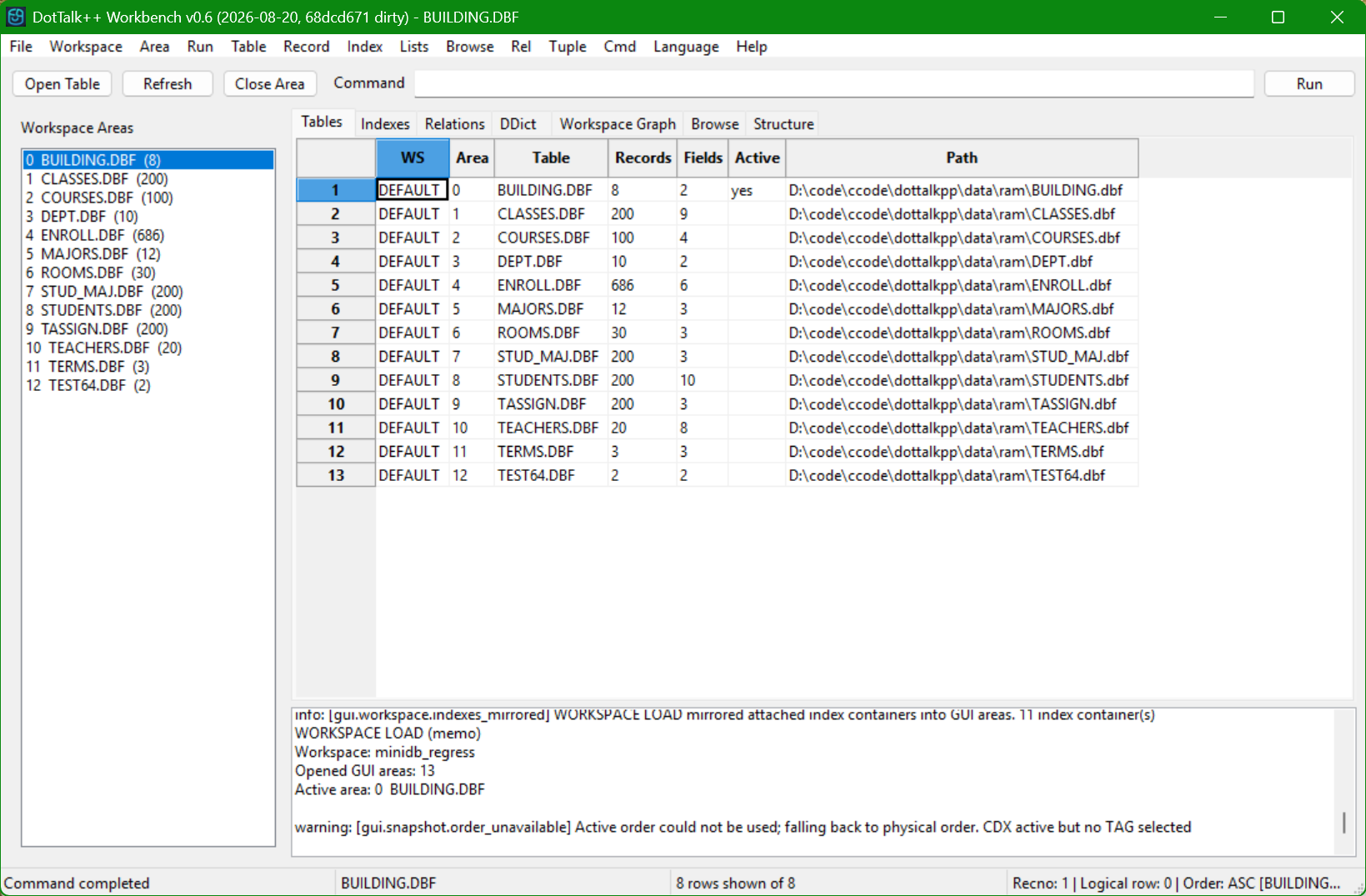
Thirteen areas out of one memo field. The Path column is the tell: every table resolves under the RAM root, not a disk directory.
The memo browser refuses, and says why
A separate window -- Memo workspaces: what is inside the memo -- reads the
workspace catalog without hydrating anything. It lists each snapshot's id, name,
format (DTSHEMA 2, DTSHEMA 3, MINIDB 1), stored size, estimated hydration
cost, save time, and whether the row is live or superseded. Selecting a
row reports what the payload actually is; the status bar states plainly how many
bytes were read and that nothing was hydrated.
Its Open in Workbench button is disabled for a superseded snapshot, and the
reason is spelled out rather than left to be inferred: WORKSPACE LOAD resolves
by name to the live row, so opening a superseded snapshot by selection would
quietly give you a different one than the row under the cursor. A workspace
carrying only a posture reports that it holds no MINIDB 1 container, with the
byte count and the reason the first line did not match.
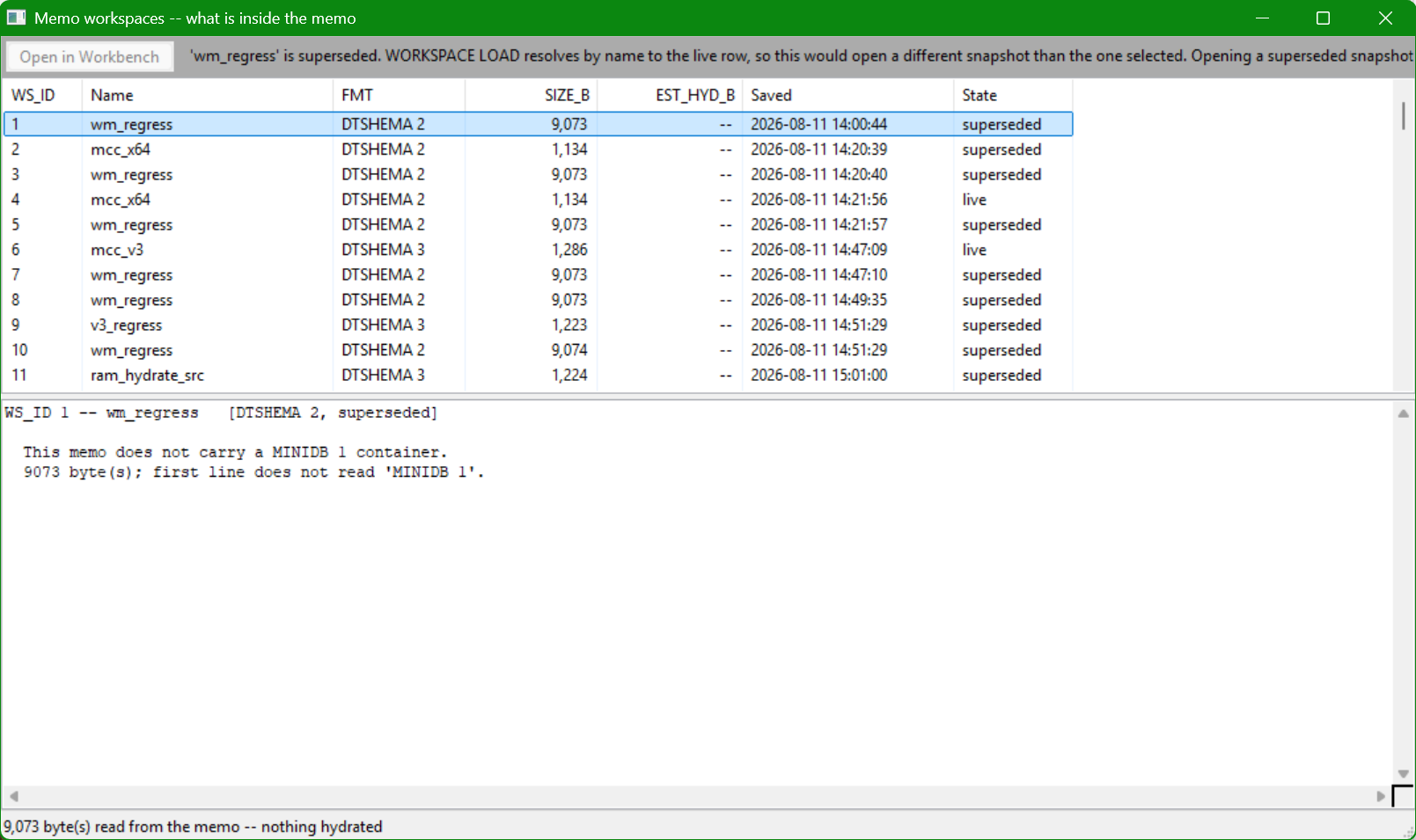
Reading the catalog without hydrating it. The status bar states the bytes read and that nothing was hydrated; the disabled button carries its own reason.
Inspect, rebuild, then open
The catalog view also makes the format boundary visible. A DTSHEMA 3 memo can
carry a workspace posture without carrying the database bytes, and Workbench
says exactly that instead of pretending it can hydrate the row. A MINIDB 1
row exposes the other case: current Alpha evidence shows a 94,200-byte
container, 24 member files, 92,139 hydrated bytes, 13 tables and 11 declared
index containers. The rebuild reports COMPLETE before the database is opened
in Workbench.
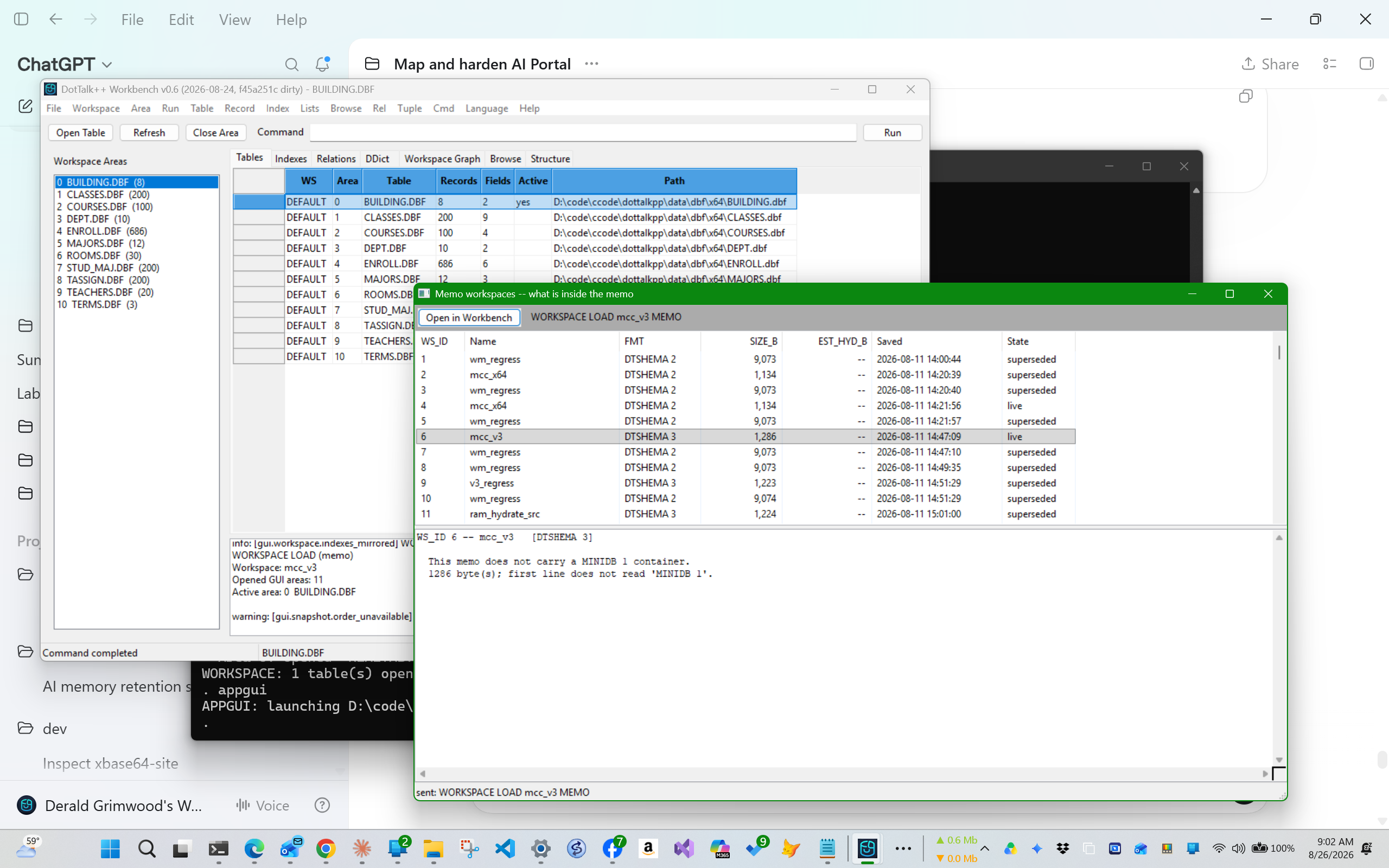
Negative-path evidence: this memo contains a workspace posture, not a MINIDB container. Inspection names the boundary and performs no hydration.
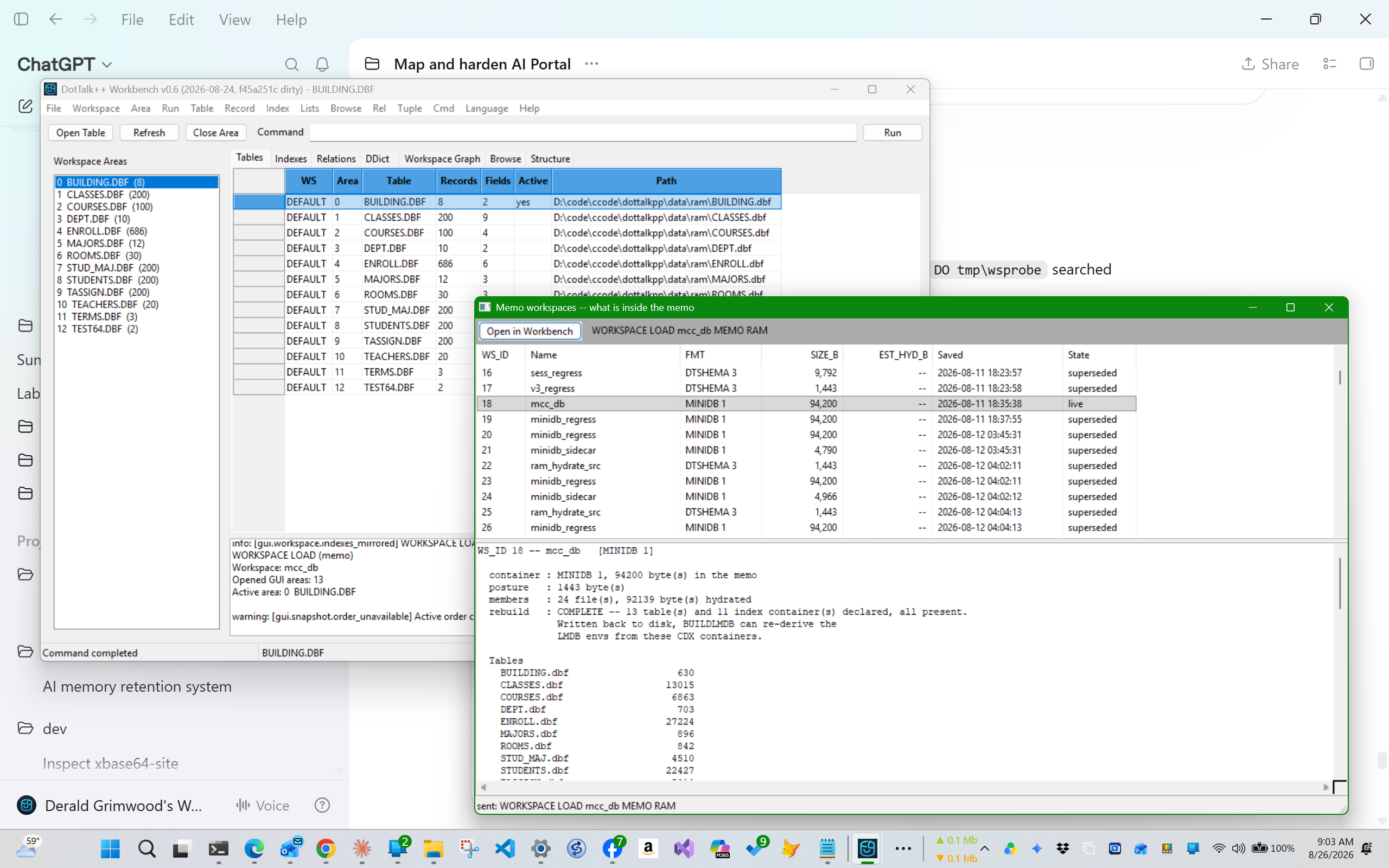
A database as a value: inspect the carrier, validate its members, rebuild the database into RAM, then open the resulting workspace in the same Workbench.
Early multi-workspace work
Co-residency and nesting have since landed. Several workspaces are resident at
once (OPEN and LOAD are both additive since 2026-08-26), a workspace records
its parent's durable id and its depth when it is created, cycles are refused, and
DESTROY retires only an empty, childless workspace.
What the architectural issue reduced to is scope: each hydrated MINIDB still needs an owned RAM root so identical table names do not collapse into one global namespace, and cross-workspace name resolution is still open. The lane stays Alpha because that surface is still moving -- not because the behaviour is unproven.
The house rule behind both behaviours is the same one the engine follows: a surface that cannot do what you asked should refuse and name the reason, not proceed and look successful.
Current Status
This is an active Alpha lane. Runtime screenshots show real GUI, TUI, and CLI states, but they are evidence artifacts, not final release-polish claims.
Two things are visible in current Workbench evidence and are recorded here rather than smoothed. A directory scan can admit a table's own backup sidecar as an extra area, so an area count may exceed the table count for a directory; the scanner's admission rules are under review. And a workspace load whose posture names a CDX container without selecting a tag warns that the active order could not be used and falls back to physical order -- the warning is correct, and carrying a tag selection through the load is open work.
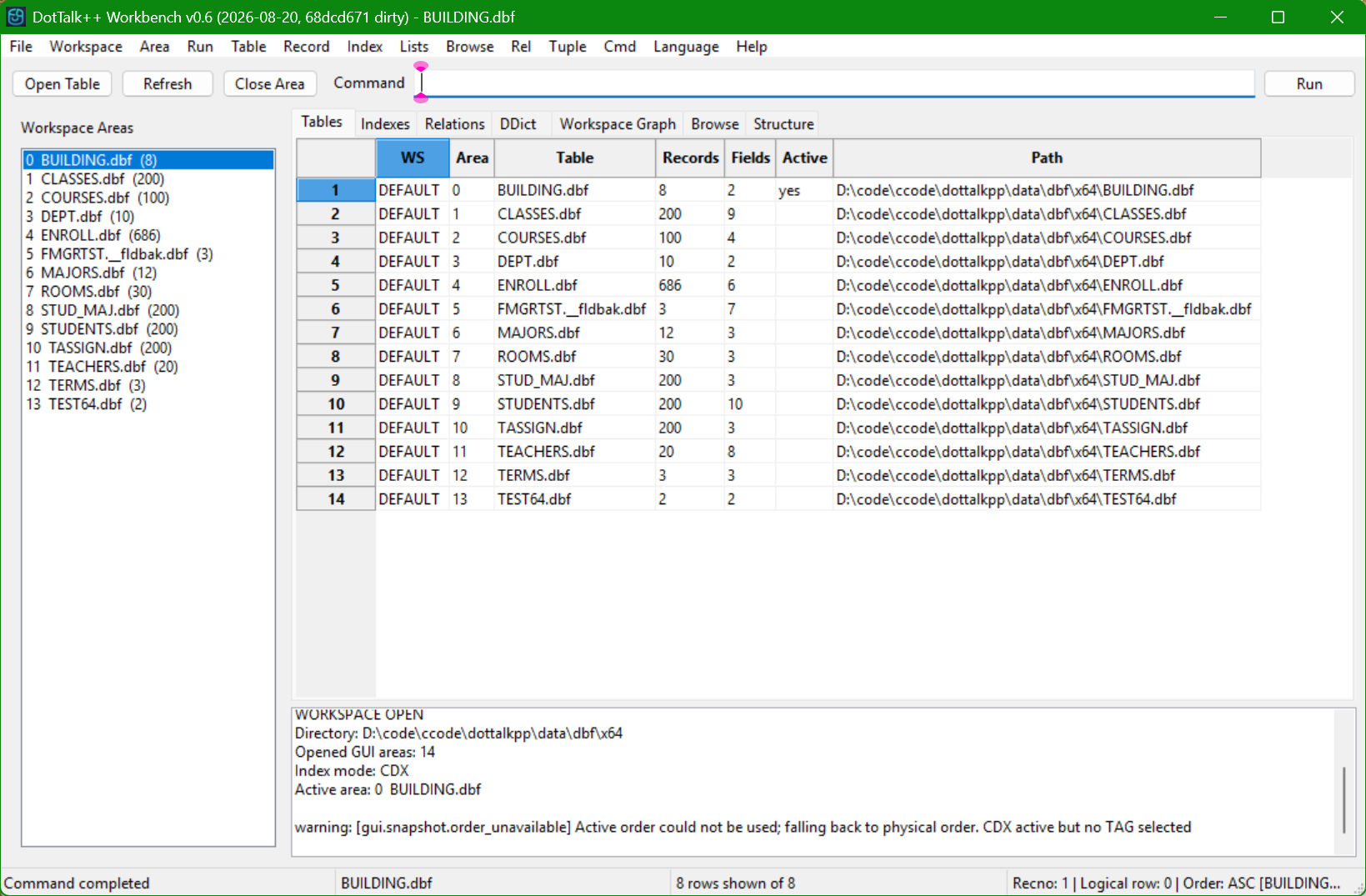
Both open items in one frame: fourteen areas over thirteen tables, and the order-unavailable warning. Published as-is rather than reshot, because a page that only shows the good frames is not evidence.
See Parallel GUI/TUI docs, Arctic TUI docs, and the Runtime Evidence Gallery.