What it does
Parallel GUI/TUI is the DotTalk++ Workbench lane that keeps multiple user interfaces attached to the same engine truth.
The lane exists because x64base is an object-oriented hybrid engine with several valid front ends: command line, GUI, TUI, browser-facing documentation, and lab portal surfaces. Those front ends should not drift into separate stories. They should read from the same command contracts, help metadata, workspaces, table buffers, relation graphs, tuple output, and runtime evidence.
Current Surfaces
Not all of these are the same kind of thing, and the difference matters:
- DotTalk++ Workbench GUI -- the real one. A window over the same engine the CLI drives, reaching the runtime through the command bridge. Alpha, and screenshot-evidenced on the product page.
- Arctic TUI -- a terminal-interface example (see below).
- DotTalk++ CLI -- startup, relation tree, workspace load, tuple-grid output.
- Template and demonstration frontends -- generated or hand-built examples in C++ and Python that show a surface rather than carry advanced behaviour.
- LabTalk Portal and website/manual evidence views.
The Workbench, in the frames
APPGUI (alias GUI) launches the Workbench. These are runtime captures, not
mockups, and they are published including their warnings.
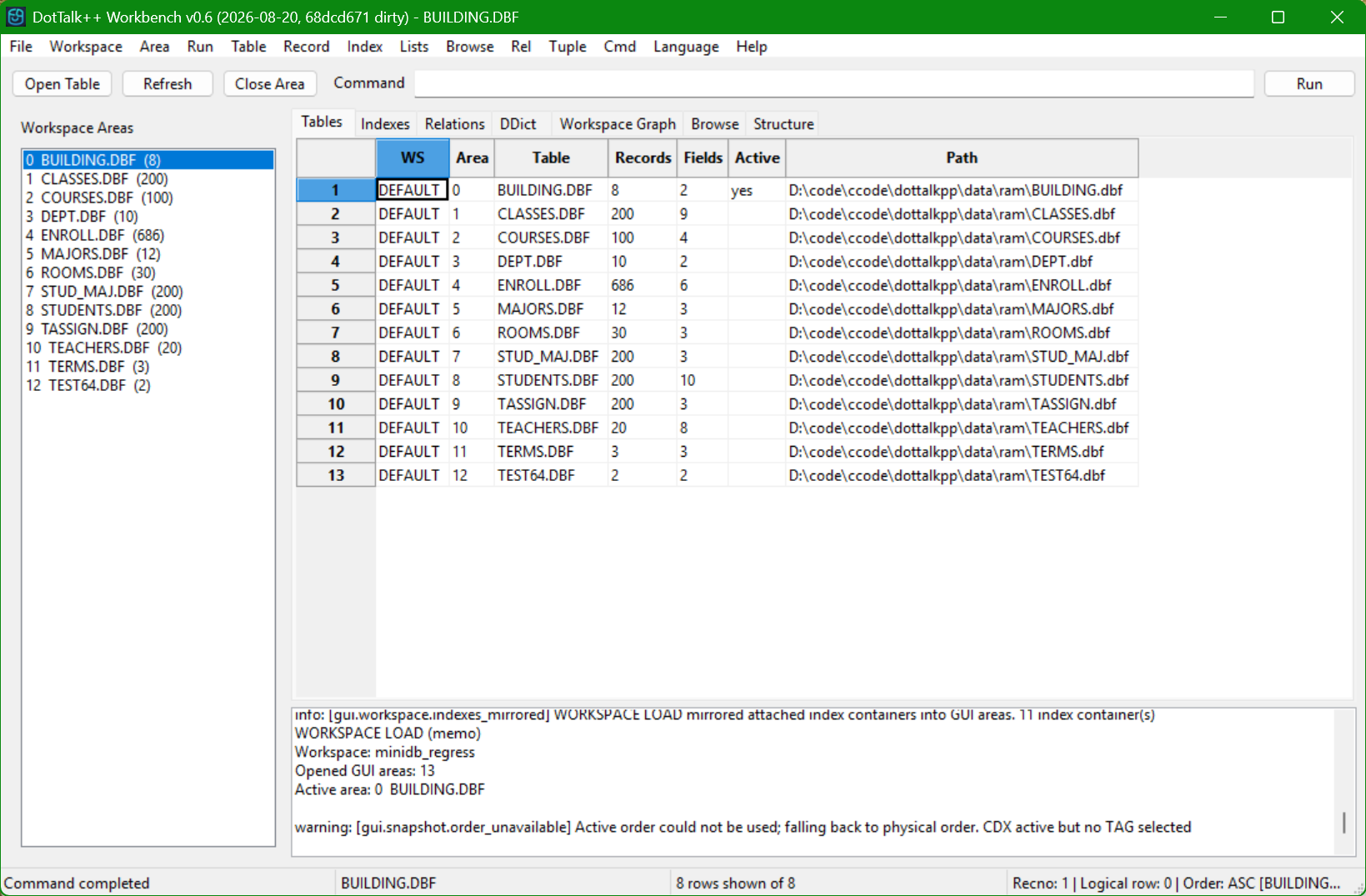
Thirteen areas out of one memo field, 2026-08-20. The Path column is the tell: every table resolves under the RAM root rather than a disk directory.
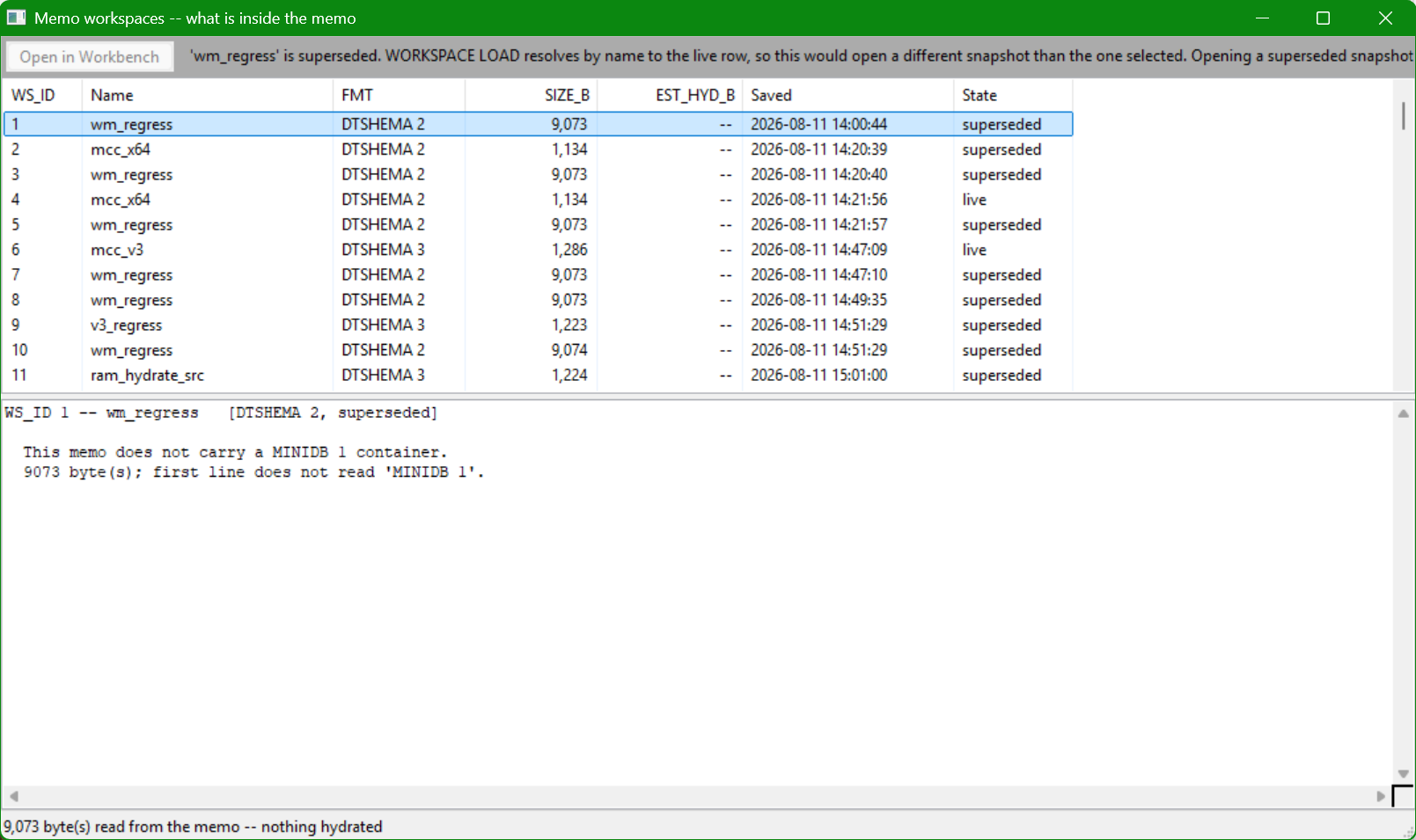
Reading the catalog without hydrating it. The status bar states how many bytes were read and that nothing was hydrated; the disabled button carries its own reason.
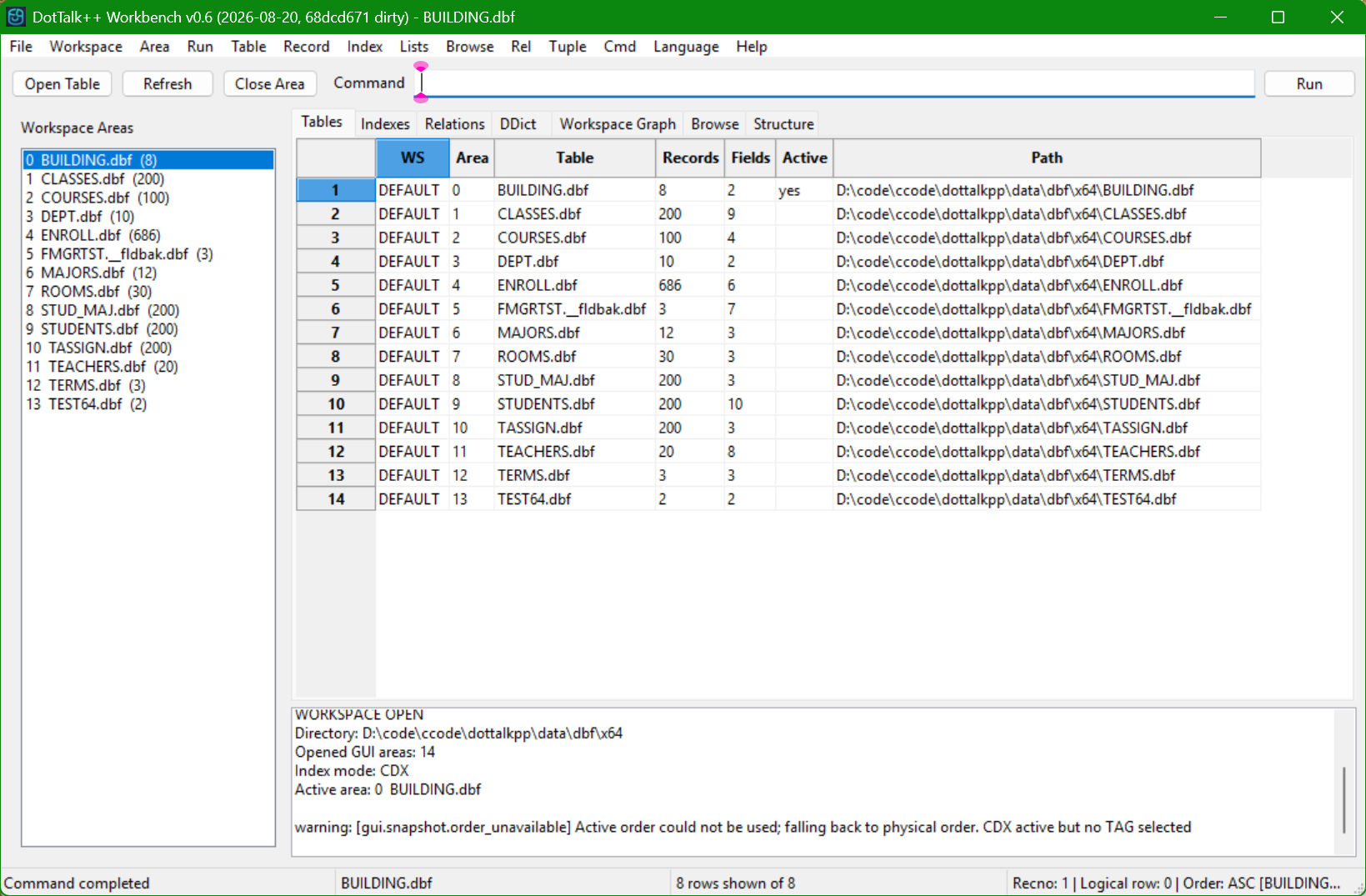
Two open defects in one frame -- fourteen areas over thirteen tables because a table's backup sidecar was admitted as an area, and an order-unavailable warning. Published as shot rather than reshot.
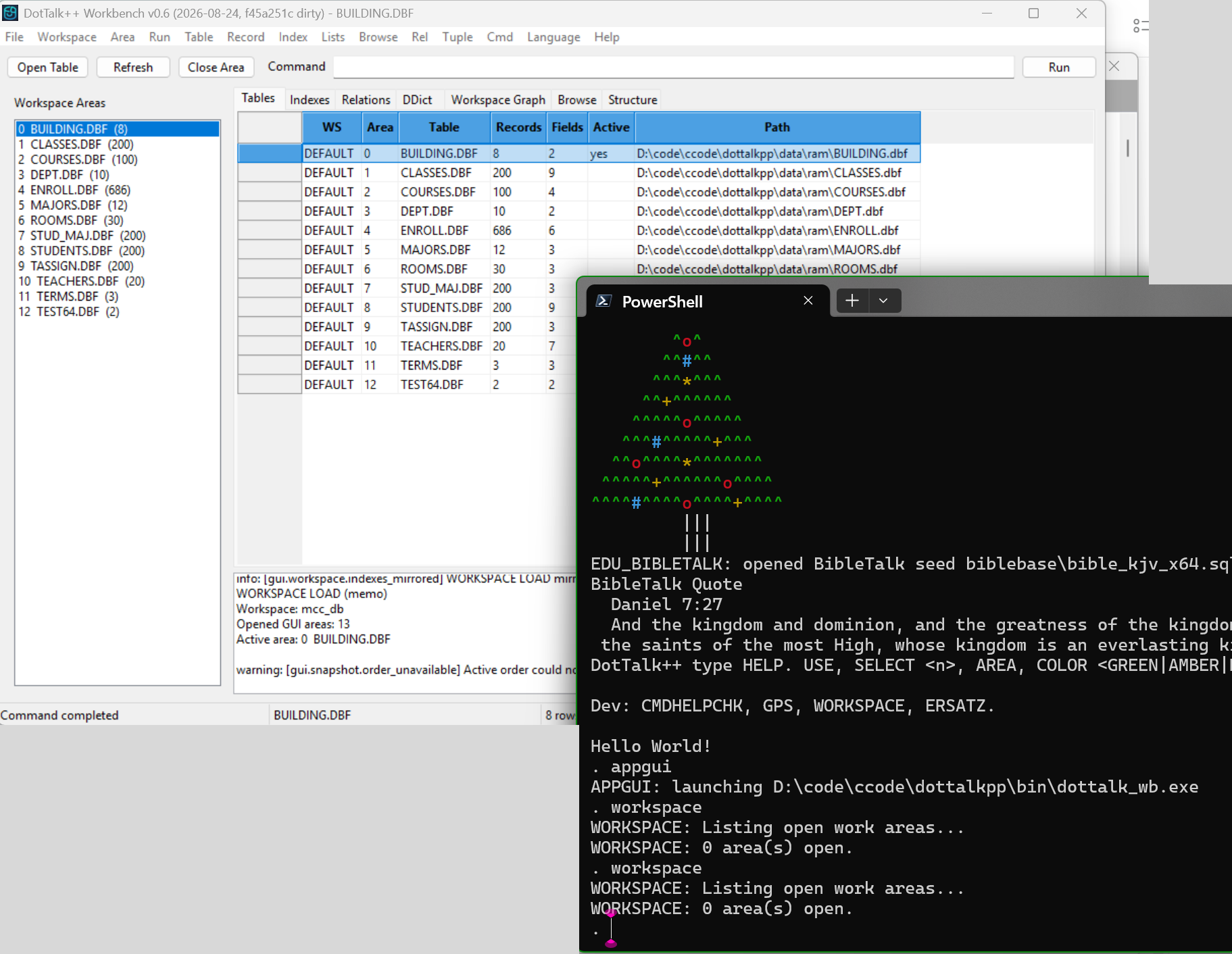
What APPGUI actually does, 2026-08-26. Typing appgui at the . prompt
prints APPGUI: launching ...\bin\dottalk_wb.exe -- the executable it is about
to run -- and starts it as a separate process. The proof of that is in the same frame: run
WORKSPACE in the shell straight afterwards and it answers 0 area(s) open,
twice, while the Workbench next to it has thirteen areas open on mcc_db with
every path under the RAM root. APPGUI is a launcher, not an in-process mode,
and the two sides do not share state. Unrelated desktop windows are masked.
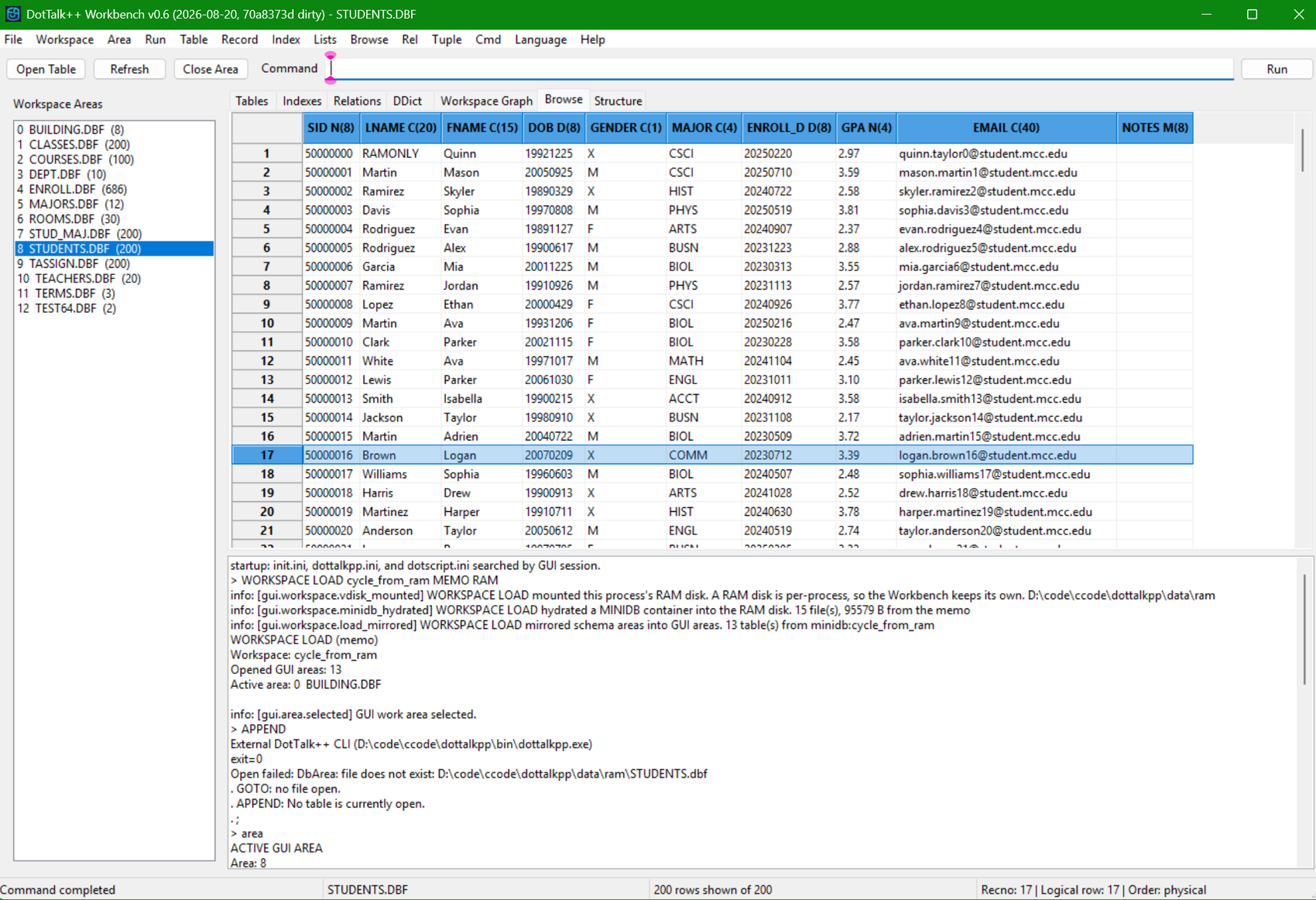
The same boundary as a defect, 2026-08-21, and the log explains itself. Loading
cycle_from_ram mounts the RAM disk with the reason attached -- "A RAM disk is
per-process, so the Workbench keeps its own" -- hydrates 15 files and 95,579
bytes out of the memo, and mirrors 13 tables; Browse then shows 200 of 200
STUDENTS rows. Two lines later APPEND is routed to the external CLI, which is
a different process, and it fails with Open failed: DbArea: file does not exist
on the RAM-disk path to STUDENTS.dbf. The table is open in the window and
absent from the process asked to append to it. Published as shot.
More frames, including the negative-path inspection and the container rebuild, are on the Parallel GUI/TUI product page and in the Runtime Evidence Gallery.
Boundaries
Parallel GUI/TUI is not a separate storage engine. Database semantics remain in x64base and DotTalk++. Table buffering belongs to TableTalk. Relation traversal belongs to RelTalk. Tuple-facing output belongs to TupTalk. The Parallel GUI/TUI lane exists to keep those engine features exposed consistently across interfaces. It is a direction the surfaces are held to, not a proof: the Workbench demonstrates it, and the template frontends illustrate it.
See Arctic TUI, TableTalk, and the Runtime Evidence Gallery.